Collections
Processing and analysis
Every collection runs through a processing pipeline that turns raw images and metadata into the artifacts the viewer needs. A handful of steps always run; the rest are optional analysis you switch on per collection.
Last updated 2026-05-29
Open a collection’s settings and choose the Processing tab to see and toggle the steps. Turning a step on (or off) stamps the collection for reprocessing; the new columns and artifacts appear when the run finishes.
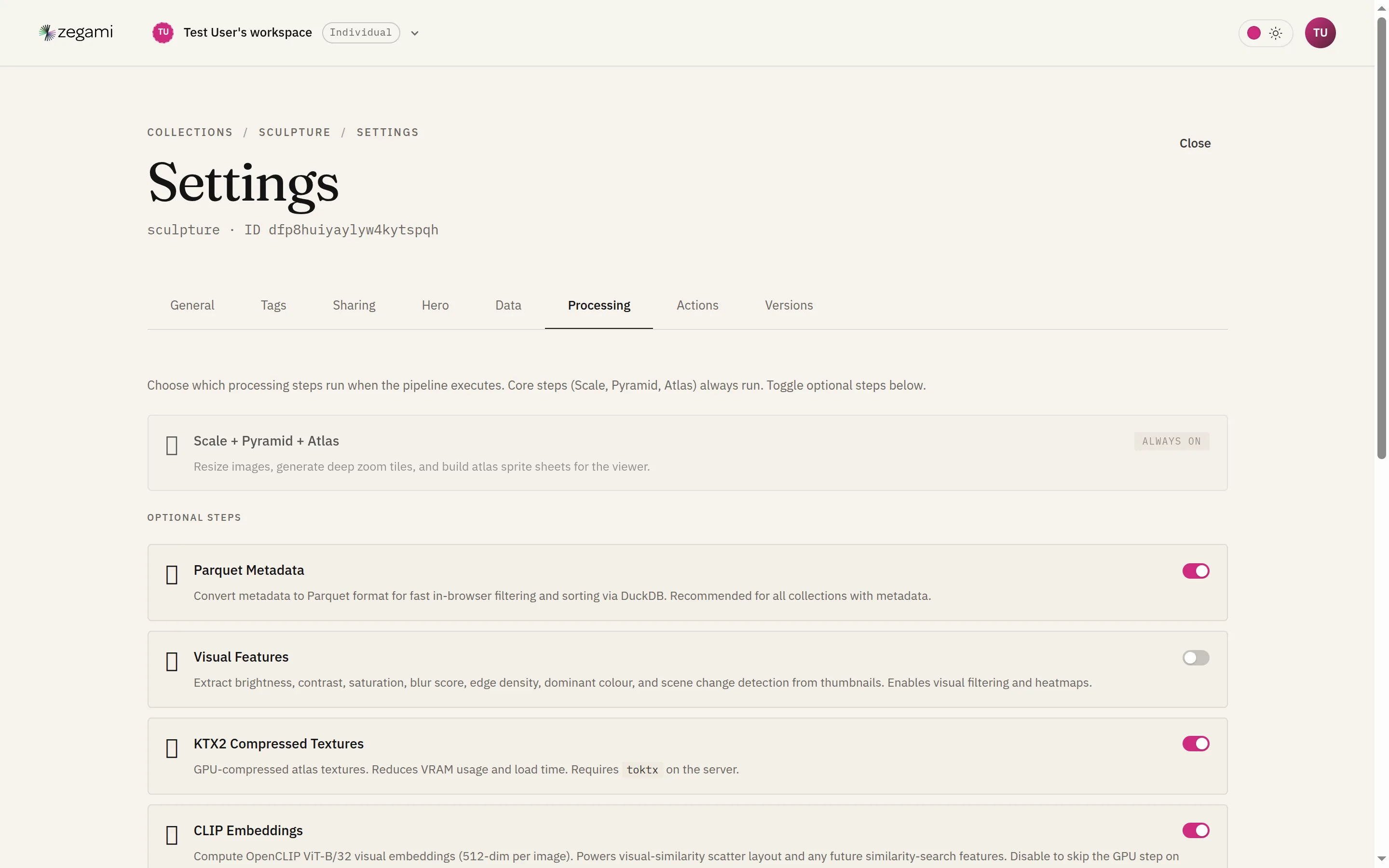
Core steps (always run)
Scale → Pyramid → Atlas build the visuals the viewer renders:
- Scale resizes each source image and records its dimensions.
- Pyramid generates deep-zoom tiles so you can zoom into an image at full resolution.
- Atlas packs thumbnails into large texture sheets so thousands of tiles render on the GPU at once.
These run for every collection — they’re what makes the grid and zoom work.
Optional analysis
| Step | What it produces | Turn it on when… |
|---|---|---|
| Parquet metadata | A columnar copy of the metadata, queried in-browser with DuckDB. | Almost always — it’s what makes filtering and sorting fast on large collections. |
| KTX2 compressed textures | GPU-compressed atlas tiles. | You want lower VRAM use and faster load. Needs toktx on the server. |
| CLIP embeddings | A 512-dim visual embedding per image. | You want visual-similarity and semantic (“a red car”) search. |
| UMAP | A 2D embedding (the MAPPER X / MAPPER Y columns). | You want a meaningful Scatter layout that clusters similar images. |
| TDA | Topological cluster + density columns. | You want cluster/outlier structure to colour or filter by. |
| Visual features | Brightness, contrast, saturation, blur score, dominant colour, scene change. | You want to filter or heatmap by image properties without writing metadata. |
| GEMMA | Text embeddings of metadata text. | You want semantic search over text fields. |
Most collections want Parquet on; the rest depend on what analysis you need. CLIP and UMAP together give you the similarity search plus the clustered scatter layout shown in Viewing collections.
Reprocessing
Changing toggles, adding images, or replacing metadata all require a reprocess. The pipeline is incremental — it skips work whose results are already current:
- Adding images reprocesses only the new images, not the whole collection.
- Metadata-only changes re-run just the metadata-dependent steps (Parquet, layout, TDA); image tiers stay cached.
- Per-image edits (replace / rotate / flip) rebuild just those slots’ tiles.
See Data tab for the content-change workflows and Uploading collections for what each pipeline step does at import time. Operational controls — cancel a run, reprocess from scratch, roll back a version — live on the Actions and Versions tabs (Collection settings).